
In this post
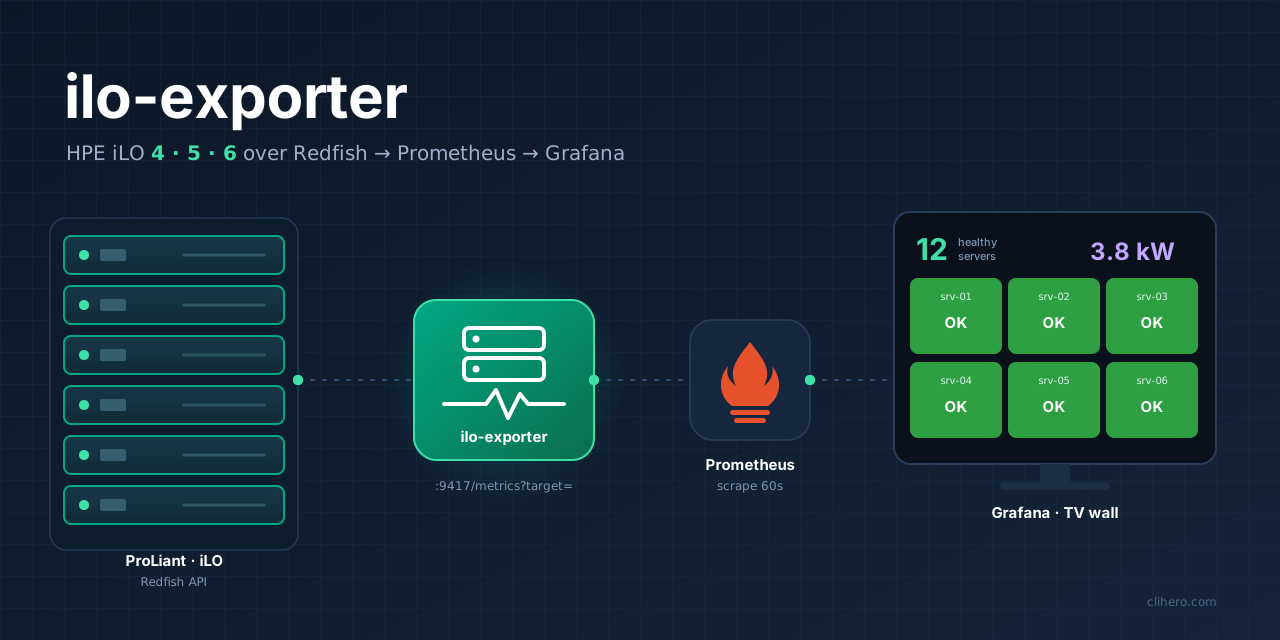

ilo-exporter
HPE iLO 4, 5 and 6 health, power and thermals for Prometheus and Grafana.
One Docker container reads all of your iLOs over Redfish.
At work we already have a good set of Grafana dashboards for the data center: rack temperatures at both sites, the UPSes, the firewalls, and a wall screen that shows the important parts at a glance. The servers were the gap. We run twelve HPE ProLiant boxes, and the only place to see whether one of them had a dead fan or a power supply without a feed was its own iLO web page, one server at a time.
I wanted every iLO on the same Grafana screen as everything else, with history and alerts. So I wrote ilo-exporter and put it on GitHub.
A note on the screenshots: server names, iLO addresses, host names and serial numbers are masked.
srv-01tosrv-12,10.20.0.xandexample.lanare not the real ones. Everything else, like power draw, temperatures and firmware versions, is real data from our servers.
iLO, Redfish and exporters in two minutes
iLO is the management chip in every HPE ProLiant. It runs even when the server is off, and it knows the state of the hardware: every temperature sensor, every fan, both power supplies, the drives, the memory. Since iLO 4 it also speaks Redfish, a REST API with JSON that looks the same across vendors, plus some HPE extras.
Prometheus collects numbers by visiting HTTP pages every minute and storing what it finds as time series. A page in its format looks like this:
ilo_power_consumed_watts{server="srv-04"} 339
ilo_fan_health{server="srv-04",fan="Fan 1"} 0
An iLO does not publish that. An exporter sits in between: it reads the source in whatever way the source wants and serves the numbers on a /metrics page. There are a few Redfish exporters already, like the iDRAC exporter that also covers iLO and an HPE-specific one from Mauve Software, and both are worth a look. I went with my own: one Python file that does HPE iLO and nothing else.
How it works
One container serves every iLO. Prometheus passes the address it wants on each scrape, /metrics?target=10.20.0.24, the same way the blackbox and SNMP exporters work. The exporter logs in to that iLO and walks the Redfish tree:
- the service root, then the manager (the iLO itself, its firmware and health)
- the system: model, serial, BIOS, power state, CPU and memory summaries, and HPE’s “health at a glance” for fans, PSUs, storage and the rest
- the chassis: every temperature sensor with its critical threshold, every fan, every power supply and the total draw
- the storage controllers and their physical drives, including SSD life left
That is about 13 requests and takes 5 to 10 seconds per iLO. Health becomes a number Grafana can color: 0 is OK, 1 is a warning, 2 is critical. The exporter also reports ilo_up and ilo_auth_failed separately, so an iLO that is down and an iLO that rejects the password raise different alerts.
Running it
The image is on GitHub’s container registry, built for amd64 and arm64.
docker run -d --name ilo-exporter --restart unless-stopped -p 9417:9417 \
  -e ILO_USERNAME=monitor -e ILO_PASSWORD='your-password' \
  ghcr.io/jaba0x/ilo-exporter:latest

curl -s "localhost:9417/metrics?target=10.20.0.24" | grep '^ilo_up'
If different iLOs have different logins, put them in a config.yml keyed by address. Then add a scrape job to Prometheus with a server label for each box. Our Prometheus runs in Docker on the same monitoring host with --web.enable-lifecycle, so adding a server is an edit to prometheus.yml and a POST /-/reload, without a restart. The repo has the full job, a target list and alert rules.
The dashboards
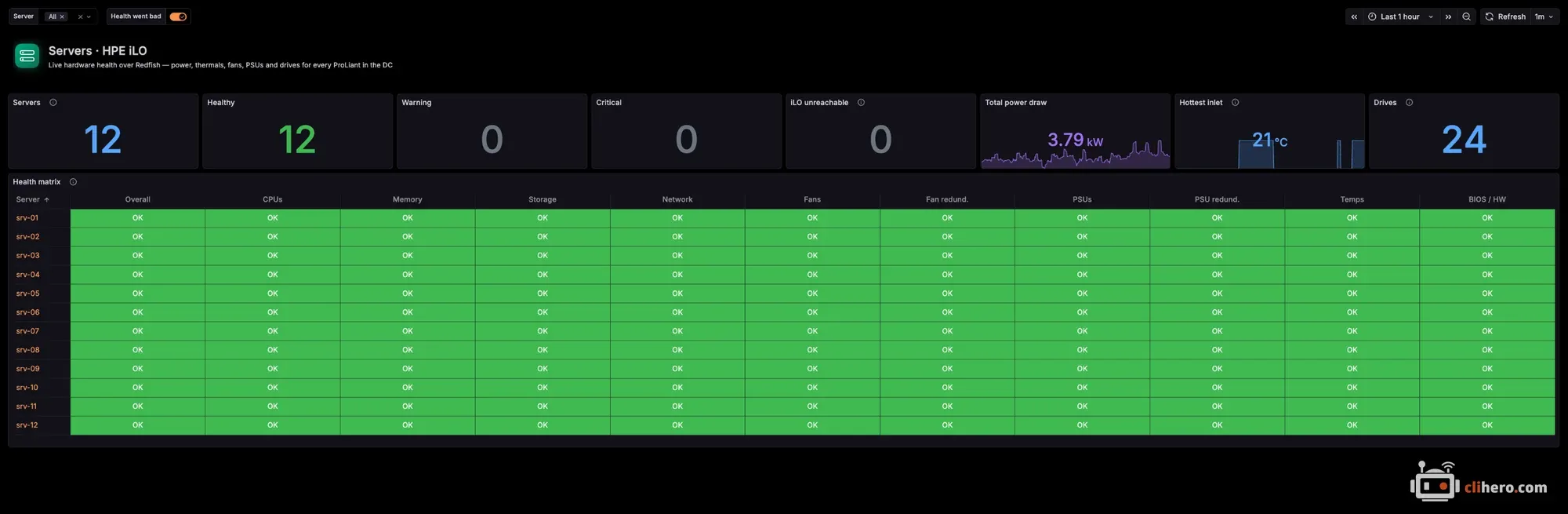
The first dashboard is the working view. Counters across the top, then a health matrix with a row per server and a column per component. With every cell green there is nothing to read, and a single amber cell stands out right away.
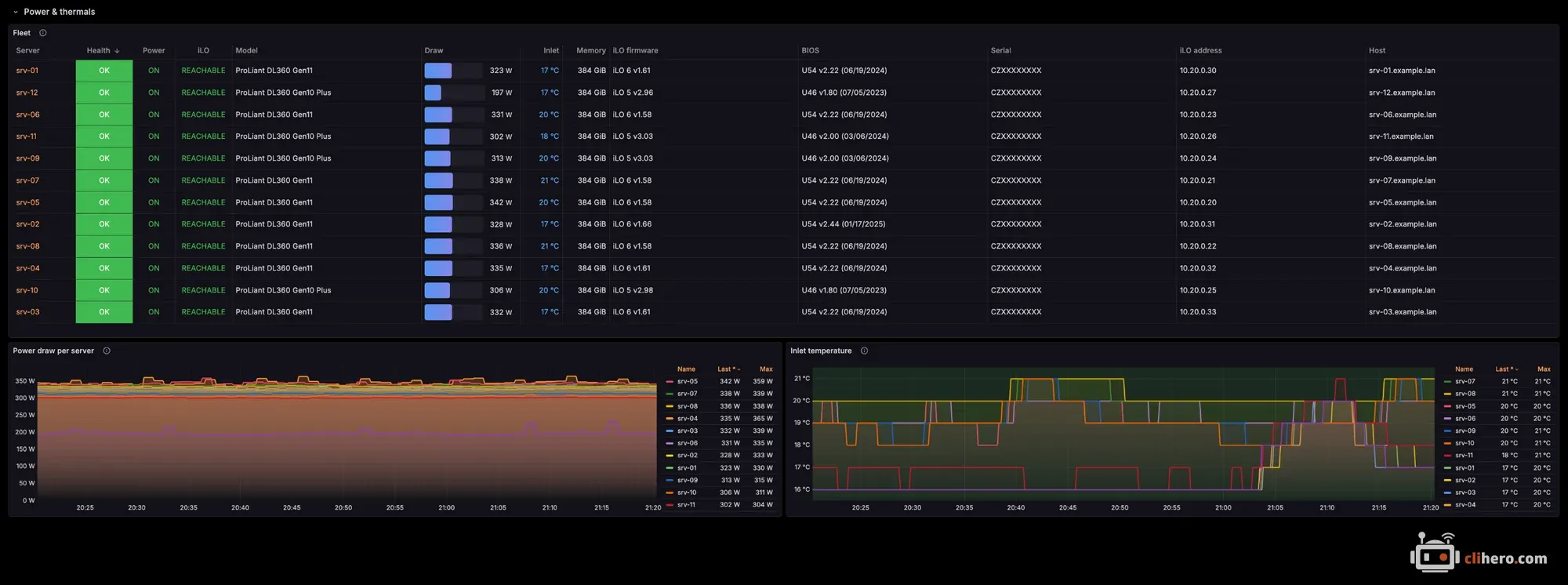
Under it is the fleet table, with model, iLO firmware, BIOS, power draw and inlet temperature for each box, and trends for power and inlet temperature. Firmware drift is easy to spot here: our eight Gen11 boxes are on three different iLO 6 versions.
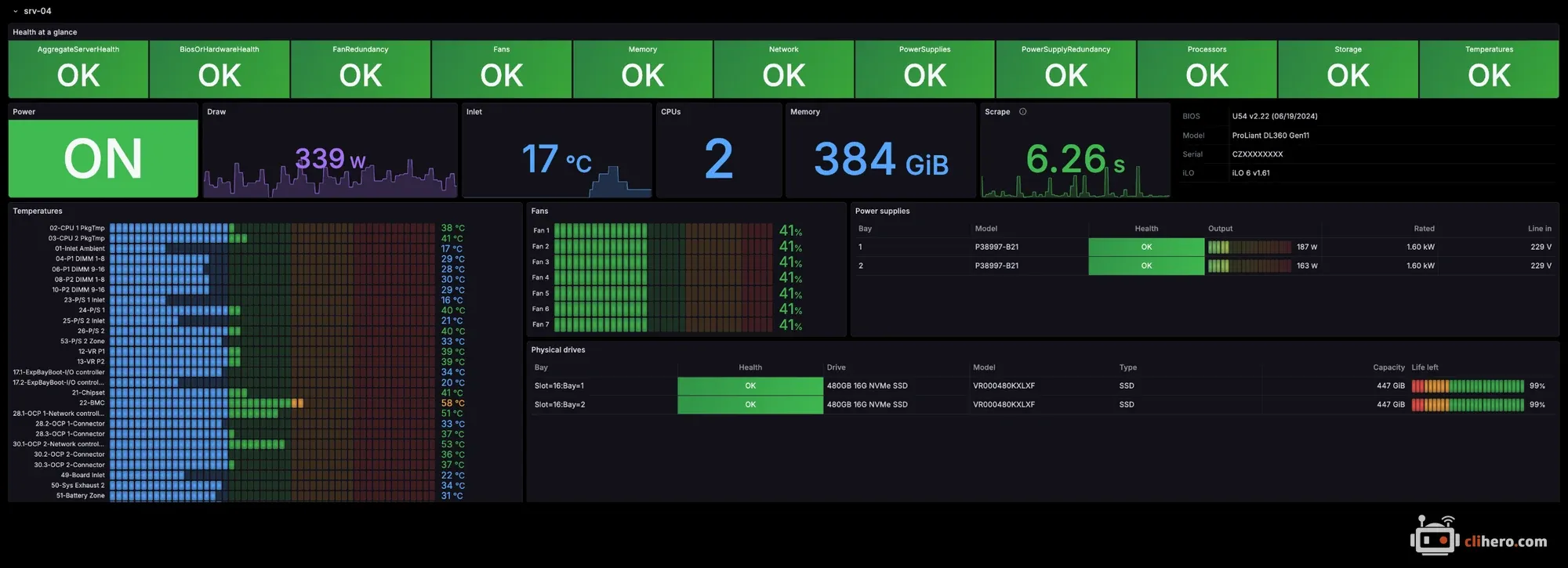
Each server also has its own section with every temperature sensor, the fans, the power supplies with output and line voltage, and the drives. These sections start collapsed, because with twelve servers expanded the page turned into a very long scroll.
The second dashboard is for the wall screen. It fits a 1080p TV without scrolling: one card per server with its health, draw and inlet temperature, a “needs attention” list that just says “All servers healthy” when everything is fine, and the trends at the bottom.
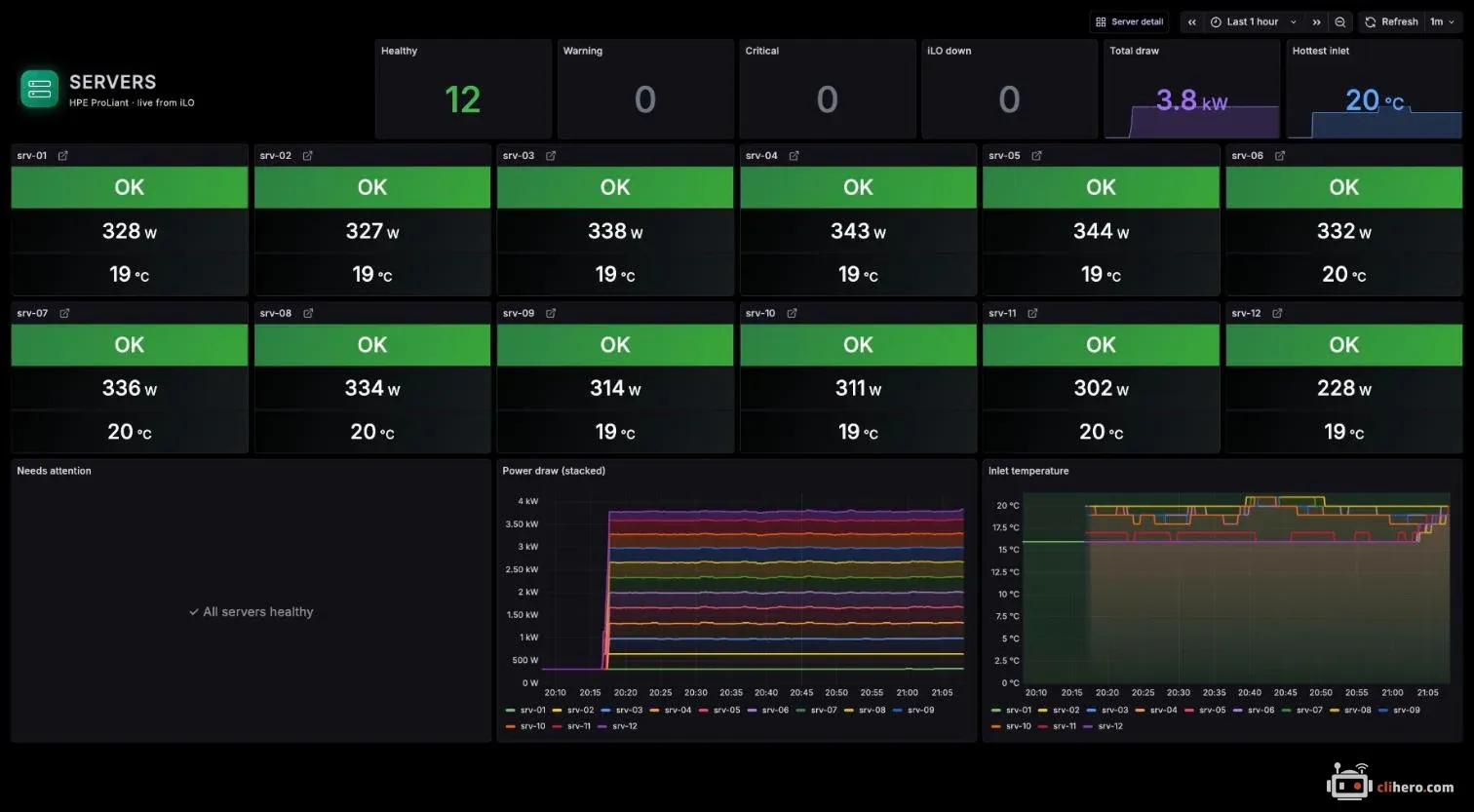
That screen has one design rule: color means something is wrong. The first version had a purple watts tile and a blue temperature tile on every card, and they competed with the health tile. Now those tiles stay dark, and the inlet tile only turns amber at 30 °C and red at 35 °C.
What I learned along the way
- iLOs drop idle connections. The first scrape against a real iLO 6 returned
ilo_up 1and nothing else. The iLO had closed the keep-alive connection and the exporter kept trying to reuse it. It now retries a request that hits a dropped connection. - Identical drives have identical names. Two 480 GB NVMe drives in the same box both report the same name, and Prometheus saw them as one series twice. Drives are now labelled by bay, like
Slot=16:Bay=2. - iLO 4 keeps storage somewhere else. iLO 5 and 6 use the standard Redfish storage tree. iLO 4 puts the drives under HPE’s SmartStorage path. The exporter reads both, and the tests run it against a small fake iLO that serves all three layouts.
- A dashboard for one server does not scale to twelve. My first health panel was a status history with a line per server and component. With twelve servers that was 132 lines of overlapping labels. The matrix shows the same thing in twelve rows.
- Give it its own iLO user. The exporter only reads, so a local iLO user with just the Login privilege is enough. A monitoring password in a config file should not be able to change anything.
So far it runs against eight DL360 Gen11 servers on iLO 6 and four DL360 Gen10 Plus on iLO 5. iLO 4 is only tested against the fake so far. If you run it on other ProLiant models, I would like to hear how it goes.
The code, both dashboards, the alert rules and the full list of metrics are on GitHub.
Follow along. New posts show up on the RSS feed. I also share my projects on GitHub, MakerWorld and LinkedIn.