
In this post
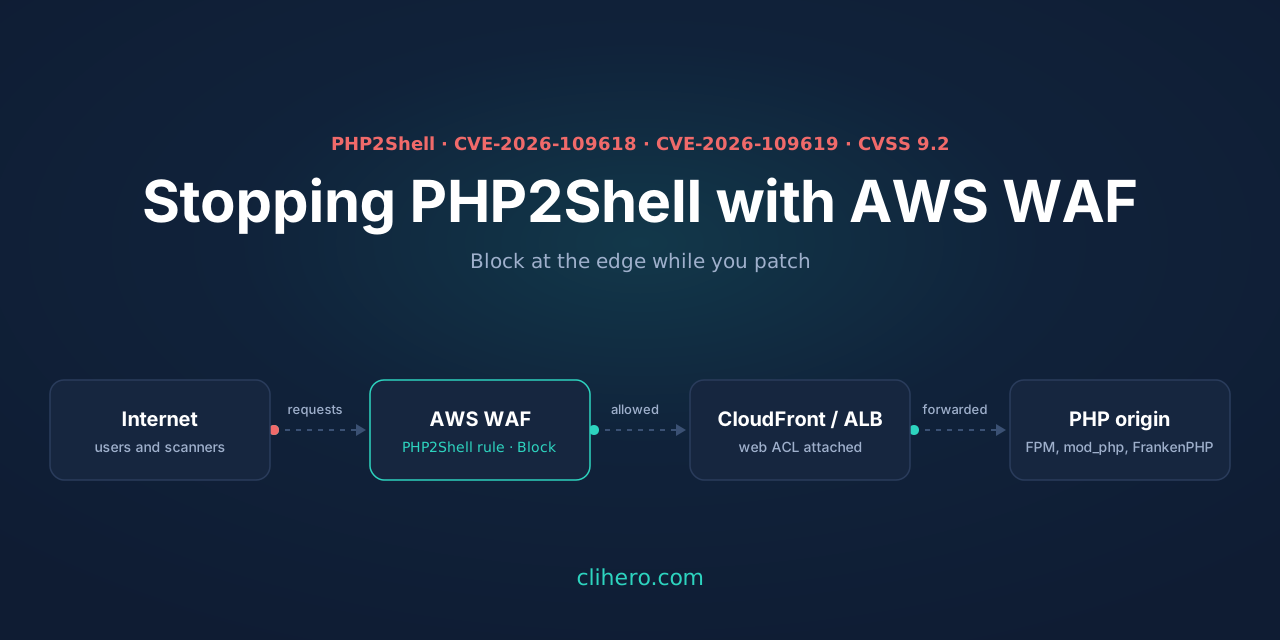
On October 21, 2026 the PHP project shipped emergency releases for two remote code execution bugs in the PHP runtime itself: CVE-2026-109618 and CVE-2026-109619, together called PHP2Shell. Both are rated 9.2 under CVSS v4.0. One unauthenticated HTTP request is enough, and it doesn’t matter what framework or CMS sits on top, because the bug is reached before your application code runs.
The fixed versions are 8.5.12, 8.4.27, 8.3.36 and 8.2.35. Upgrading is the only real fix. It also takes time when PHP is spread across a fleet, so the same morning I put AWS WAF rules in front of everything that sits behind CloudFront. This post covers what the bugs are, what an attacker can do with them, and the exact WAF setup I used.
A note on the screenshots: every web ACL name, rule name, account name and account ID you see below is a demo value. I masked the real ones before taking the screenshots, so
demo-main-waf,Allow-Static-Files,Demo Corpand111122223333are not real resources.
How the bugs work
Both bugs live in the way PHP reads a multipart/form-data request (the format browsers use for file uploads) and in how it cleans up after a request. That parsing happens inside PHP before your script is loaded, so your input validation never gets a chance to see the request.
CVE-2026-109618 is about running out of memory at the wrong moment. If PHP hits its memory limit while it’s halfway through building its internal request data, the request is aborted. The cleanup code that runs afterwards then treats the half-built data as if it were complete and valid. An attacker who can push PHP into that state on purpose can turn the corrupted memory into code execution.
CVE-2026-109619 is about leftover state. Some internal request state can outlive the memory it points to. PHP-FPM and mod_php reuse the same worker process for many requests, so a later request on that worker can read the stale pointer before it gets reset. One request plants the data, a following request triggers it.
PHP’s session upload progress feature (session.upload_progress.enabled, the thing that reports how far a file upload has got) is one of the confirmed triggers. On PHP 8.5 the fatal_error_backtraces setting is another. Every web-facing PHP setup is affected: PHP-FPM, Apache with mod_php, php-cgi, FrankenPHP and LiteSpeed.
Amazon’s MadPot honeypots saw an exploitation attempt on October 17, four days before the public disclosure, and other honeypot networks started reporting attempts on the day the advisories went out. The UK NCSC’s advice is to take unpatchable systems offline.
What happens to a server if it’s exploited
RCE means the attacker’s code runs on your server as the user that runs PHP, usually www-data, apache, nginx or the FPM pool user. That account already has a lot:
- It can read everything PHP can:
.envfiles,wp-config.php, database passwords, API keys, SMTP credentials and any cloud access keys sitting in config. On EC2 it can also call the instance metadata service and pick up the instance role’s temporary credentials if IMDSv1 is still allowed. - With the database password it can dump customer records, sessions and password hashes.
- The usual first step is a webshell: a small PHP file dropped into a writable folder (uploads, cache, a plugin directory) that gives the attacker a way back in even after you patch.
- Cryptominers and botnet agents are the most common payloads on mass-exploited web bugs. You notice them as a CPU at 100% and a higher AWS bill.
- Your site can be defaced, filled with SEO spam pages or phishing kits, or used to serve malicious JavaScript to your visitors.
Getting root is a second step. The attacker looks for a local privilege escalation: an unpatched kernel, a sudo rule that lets the web user run something, a writable cron job or systemd unit, SUID binaries, or a Docker socket the web user can reach. Containers help only if the container isn’t privileged and doesn’t mount the host. Once they have root, they can wipe logs, install a rootkit and move to other machines on the same network. After that, the only safe option is to rebuild the server from a clean image and rotate every secret it held.
My setup
My web apps sit behind CloudFront, with AWS WAF and Shield in front. In the WAF console the web ACLs are now called “protection packs”. All of them are CloudFront (global) scope, so they live in us-east-1:
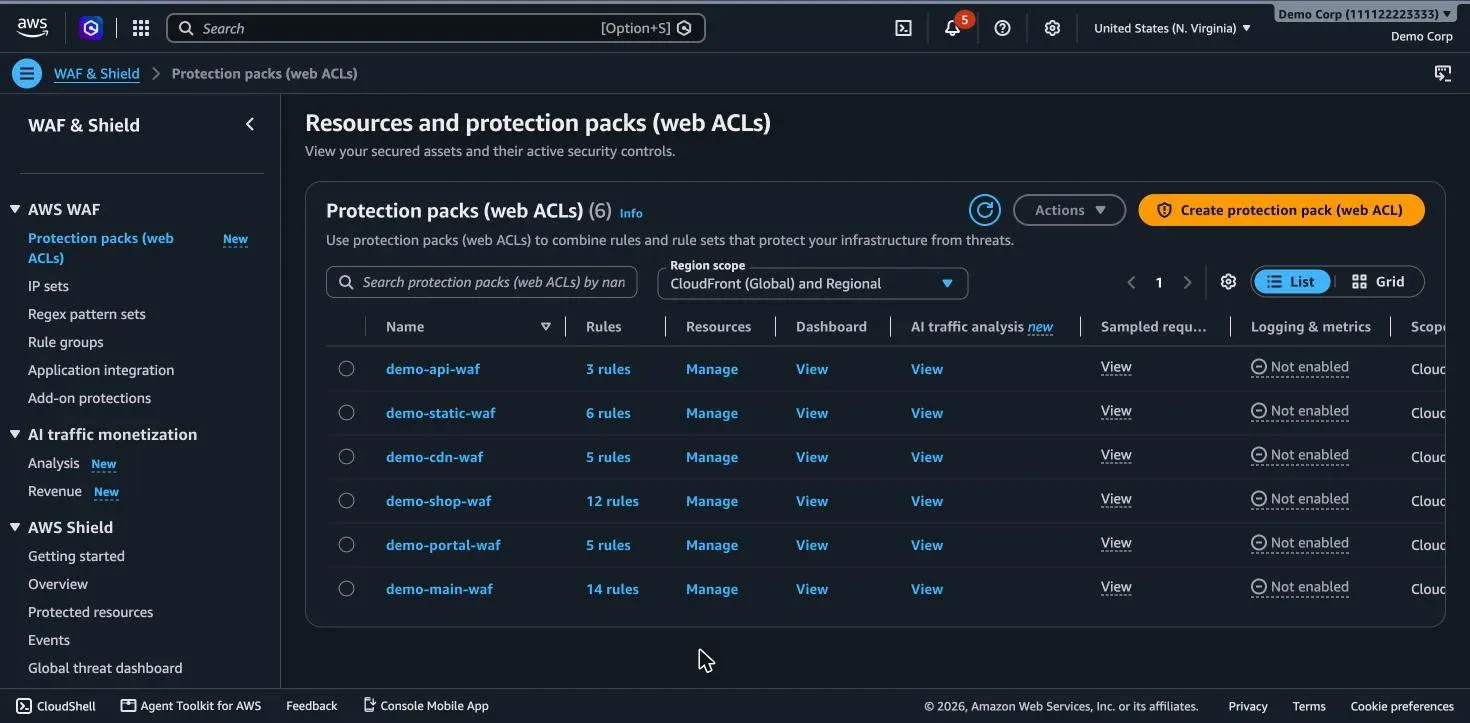
AWS published a WAF guide for PHP2Shell with one main rule and three optional ones. I added all four to the three packs that protect PHP apps.
The main rule
It blocks a request only when all three conditions match:
- the method is
POST - a
PHPSESSIDis present, as a cookie name or anywhere in the body - the body contains
PHP_SESSION_UPLOAD_PROGRESS, the form field that turns on PHP’s upload progress tracking
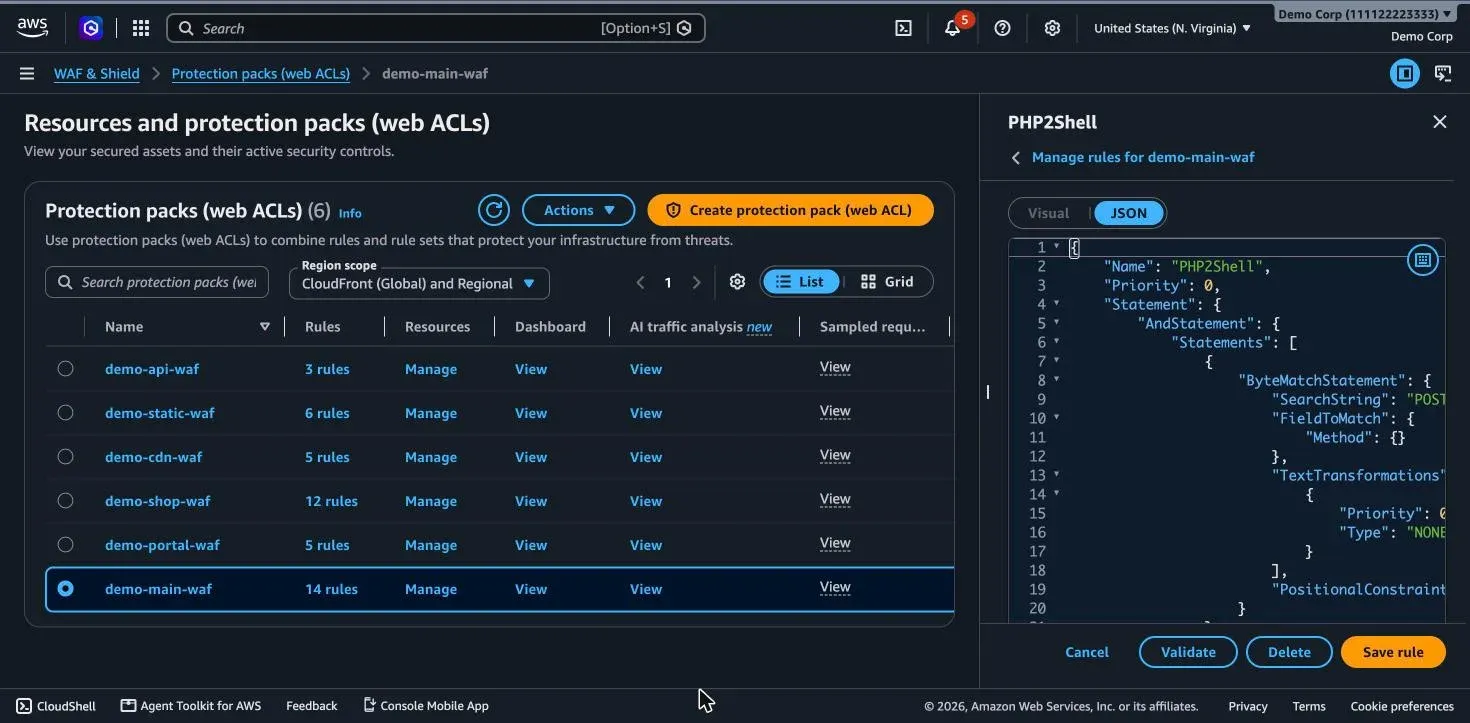
Normal traffic almost never sends that field, so I put this one straight into Block. If your app really uses upload progress bars, start it in Count.
{
  "Name": "PHP2Shell",
  "Priority": 0,
  "Statement": {
    "AndStatement": {
      "Statements": [
        { "ByteMatchStatement": {
            "SearchString": "POST",
            "FieldToMatch": { "Method": {} },
            "TextTransformations": [{ "Priority": 0, "Type": "NONE" }],
            "PositionalConstraint": "EXACTLY" } },
        { "OrStatement": { "Statements": [
            { "ByteMatchStatement": {
                "SearchString": "PHPSESSID",
                "FieldToMatch": { "Cookies": { "MatchPattern": { "All": {} }, "MatchScope": "KEY", "OversizeHandling": "CONTINUE" } },
                "TextTransformations": [{ "Priority": 0, "Type": "NONE" }],
                "PositionalConstraint": "EXACTLY" } },
            { "ByteMatchStatement": {
                "SearchString": "PHPSESSID",
                "FieldToMatch": { "Body": { "OversizeHandling": "CONTINUE" } },
                "TextTransformations": [{ "Priority": 0, "Type": "NONE" }],
                "PositionalConstraint": "CONTAINS" } } ] } },
        { "ByteMatchStatement": {
            "SearchString": "PHP_SESSION_UPLOAD_PROGRESS",
            "FieldToMatch": { "Body": { "OversizeHandling": "CONTINUE" } },
            "TextTransformations": [{ "Priority": 0, "Type": "NONE" }],
            "PositionalConstraint": "CONTAINS" } }
      ]
    }
  },
  "Action": { "Block": {} },
  "VisibilityConfig": { "SampledRequestsEnabled": true, "CloudWatchMetricsEnabled": true, "MetricName": "PHP2Shell" }
}
The three extra rules
These can break real traffic, so they go in as Count first. They only record matches in CloudWatch and sampled requests, and nothing gets blocked until you flip them.
| Rule | Matches | Why it can hurt |
|---|---|---|
Block-Multipart-FormData | any Content-Type: multipart/form-data | blocks every file upload |
Block-Oversize-Body | request bodies over 8 KB | blocks large JSON POSTs and uploads |
RateLimit-Posts | more than 100 POSTs per IP per minute | busy API clients and offices behind one NAT IP |
If an app has no uploads at all, blocking multipart is the strongest of the three, because it removes the out-of-memory path completely. For CloudFront the WAF inspects the first 16 KB of the body by default, which is enough for the 8 KB size rule.
Rule order matters
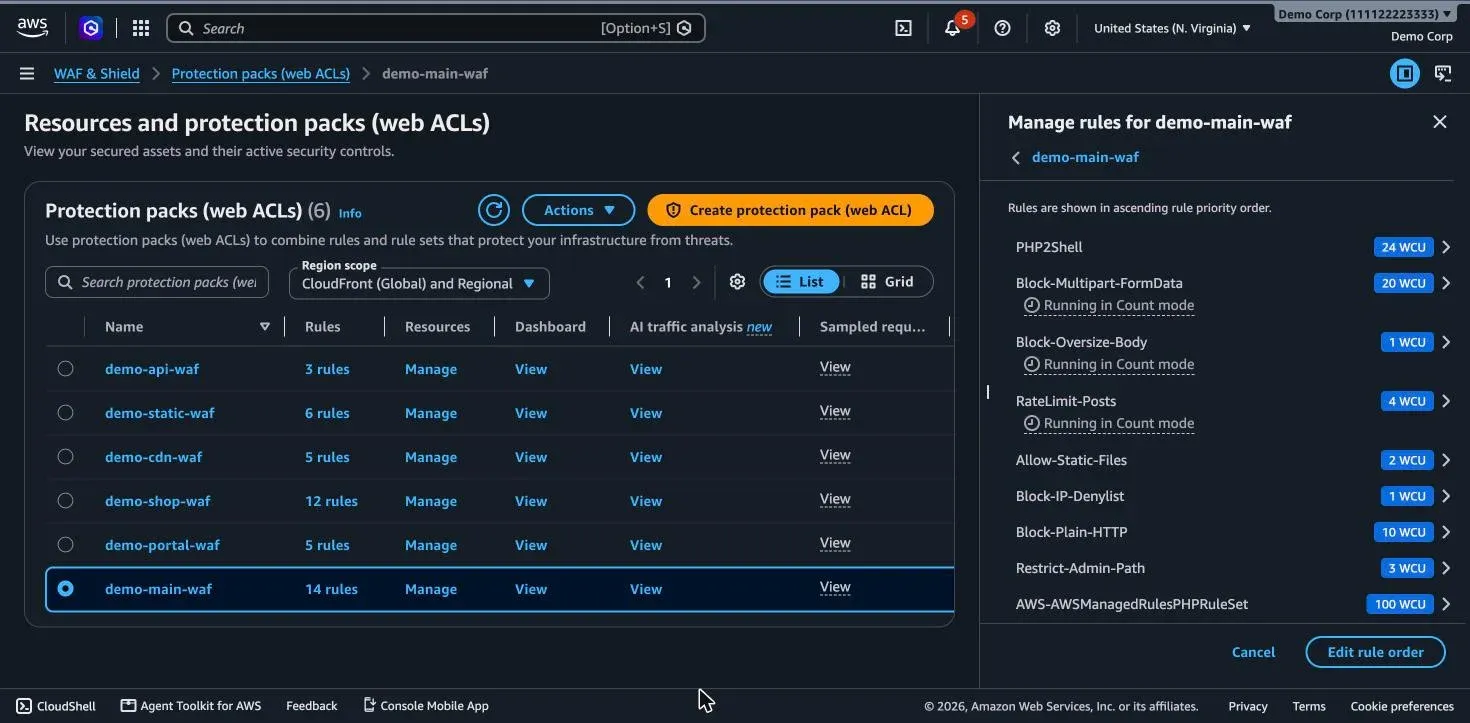
New rules usually get added at the bottom. I wanted the opposite: if an Allow rule (an IP allowlist, a path exception) sits above the PHP2Shell rule, a matching request is let through before the block rule ever looks at it. In one of my packs there’s an allow rule for static file downloads and another for a partner’s IP range, and I don’t want either to skip this check.
So the four new rules go to priority 0 to 3 and every existing rule moves down by 10, keeping its original order:
Applying it from CloudShell
The new console works fine for one rule in one pack. For four rules in three packs I used CloudShell (the terminal icon in the console bar) and a short Python script with boto3, which is already installed there. It:
- saves a backup of each web ACL as JSON before touching it
- puts the new rules first and shifts the old ones down by 10
- runs
check_capacityso you see the WCU cost before anything changes - only writes when you pass
apply
import boto3, json, sys

waf = boto3.client("wafv2", region_name="us-east-1")   # CloudFront scope lives in us-east-1
APPLY = sys.argv[1:] == ["apply"]
ACLS = ["demo-shop-waf", "demo-portal-waf", "demo-main-waf"]   # your web ACL names

NEW_RULES = json.load(open("php2shell-rules.json"))   # the four rules, priorities 0-3

acls = {a["Name"]: a for a in waf.list_web_acls(Scope="CLOUDFRONT")["WebACLs"]}
for name in ACLS:
    resp = waf.get_web_acl(Name=name, Scope="CLOUDFRONT", Id=acls[name]["Id"])
    acl = resp["WebACL"]
    json.dump(resp, open(f"waf-backup-{name}.json", "w"), default=str, indent=1)

    new_names = {r["Name"] for r in NEW_RULES}
    old = [r for r in acl["Rules"] if r["Name"] not in new_names]
    rules = NEW_RULES + [dict(r, Priority=r["Priority"] + 10) for r in old]

    print(name, "->", ", ".join(f'{r["Priority"]}:{r["Name"]}' for r in rules))
    print("  capacity", waf.check_capacity(Scope="CLOUDFRONT", Rules=rules)["Capacity"], "WCU")

    if APPLY:
        keep = ["DefaultAction", "VisibilityConfig", "Description", "CustomResponseBodies",
                "CaptchaConfig", "ChallengeConfig", "TokenDomains", "AssociationConfig",
                "DataProtectionConfig"]
        extra = {k: acl[k] for k in keep if acl.get(k)}
        waf.update_web_acl(Name=name, Scope="CLOUDFRONT", Id=acl["Id"],
                           LockToken=resp["LockToken"], Rules=rules, **extra)
        print("  updated")
update_web_acl replaces the whole web ACL, so anything you don’t send back is lost. That’s why the script copies the default action, custom response bodies, CAPTCHA settings and the rest from what it just read. The LockToken makes the call fail if someone else changed the ACL in the meantime, instead of silently overwriting their change.
I ran it once without apply to check the plan and the capacity (406, 59 and 492 WCU, well under the 5,000 limit), then with apply. I’ve since cleaned the script up into php2shell-guard, which adds a check command that flags web ACLs where the rule is missing, only counting, or sitting below an Allow rule, plus a test command and a host-side checker. Then I read the live config back:
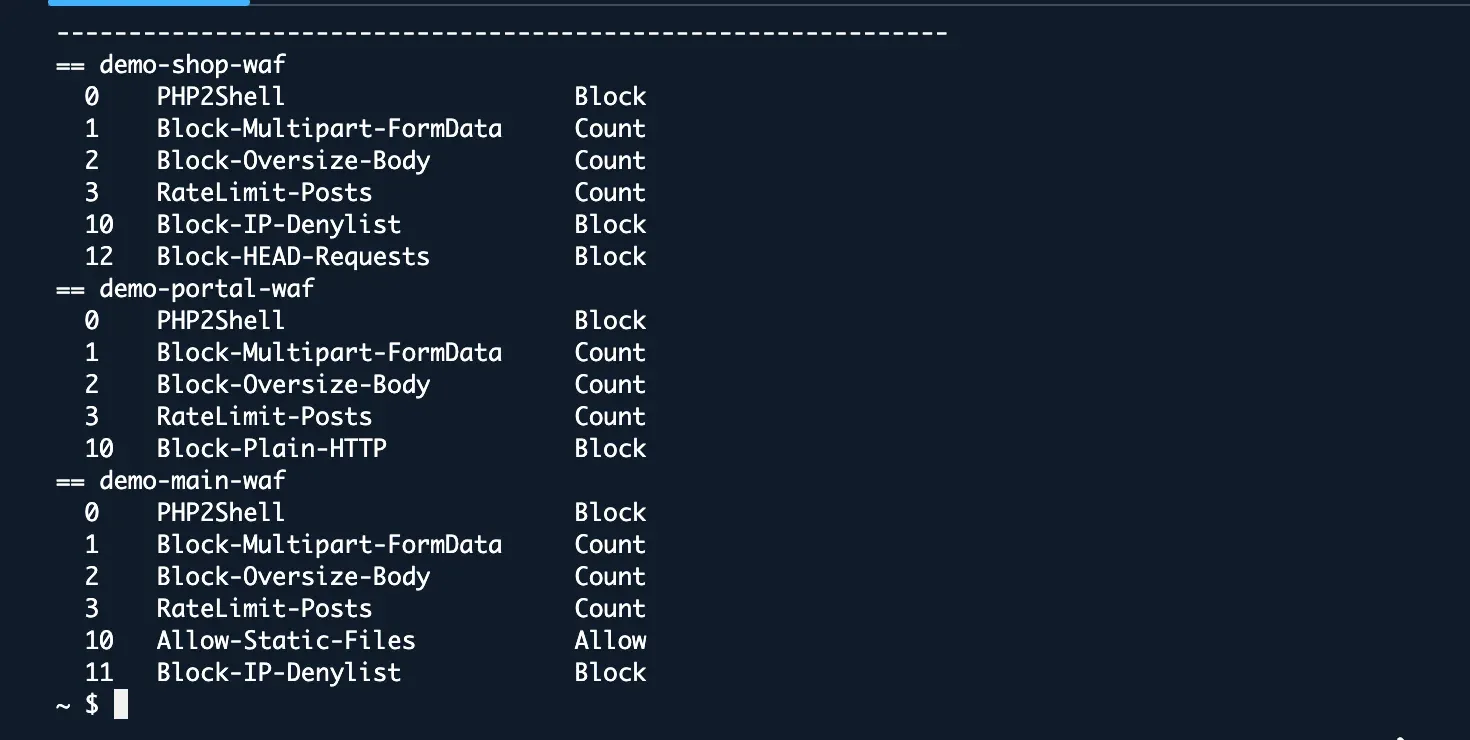
And the rule as the console shows it:
What the WAF doesn’t cover
The WAF only sees HTTP. It doesn’t parse the inside of each multipart part, and it has no idea what’s happening in PHP’s memory. CVE-2026-109619 is mostly out of its reach, and if your app accepts uploads, an attacker can still stay under the body size cap with lots of small part headers. So on the servers, until the upgrade is done:
; php.ini or the FPM pool config, then restart every worker
session.upload_progress.enabled = 0
fatal_error_backtraces = 0      ; PHP 8.5 only
post_max_size = 8M              ; 32M if the app takes uploads
; php-fpm pool, if you can afford the performance hit
pm.max_requests = 1pm.max_requests = 1 recycles the worker after every request, which breaks the plant-then-trigger chain of the stale state bug. Set memory limits with container or cgroup limits, not RLIMIT_AS, because hitting that limit is exactly the out-of-memory path the first bug needs.
One more thing I noticed while doing this: WAF logging was off on all six of my packs. The rules still publish CloudWatch metrics and sampled requests, so I can see what the Count rules match, but turning on full logs is next on my list.
My checklist
- Find every PHP install and its version. Anything below 8.2.35 / 8.3.36 / 8.4.27 / 8.5.12 is vulnerable.
- Add the PHP2Shell rule at the top of every web ACL in front of PHP, above any Allow rules.
- Add the multipart, body size and rate rules in Count, check the metrics after a day, then decide.
- Turn off
session.upload_progressand, on 8.5,fatal_error_backtraces. - Upgrade PHP. Keep the WAF rule afterwards as a second layer.
- If a server was exposed before you got here, look for PHP files you didn’t put there (uploads and cache folders first), unexpected processes and outbound connections.
Sources: AWS Security Blog, PHP release announcement, Help Net Security.